
Same code as the CW Flasher but you use a switch to activate the flash.
CW Callsign Keyer
Basically the same code as CW Flasher but with a switch to activate the LED
Also available on Github
Published: 29 April 2026
104 Downloads
// --- CW KEYER WITH PUSH BUTTON ---
// Wavewizards.org M9WWA
// This sketch turns a push-button into a Morse code keyer.
// When pressed, it sends your callsign in Morse code.
// Uses a simple momentary switch connected to pin 2.

// Hardware:
// - Push-button connected between pin 2 and GND
// - 10kΩ pull-down resistor (optional but recommended)
// - LED on pin 13 (optional for visual feedback)

// Define pins
const int buttonPin = 2;     // Push-button connected to digital pin 2
const int ledPin = 13;       // Built-in LED on pin 13 (optional)

// Define your callsign
const char callsign[] = "M9WWA";

// Morse code timing
const int dotDuration = 200;     // 200ms = 1 dot
const int dashDuration = 600;    // 600ms = 1 dash
const int spaceDuration = 200;   // Space between dots/dashes
const int letterSpace = 600;     // Space between letters
const int wordSpace = 1200;      // Space between words

// Morse code lookup table (A-Z, 0-9)
const char* morseCode[] = {
  ".-",   "-...", "-.-.", "-..",  ".",    "..-.", "--.",  "....", "..",   ".---",  // A-J
  "-.-",  ".-..", "--",   "-.",   "---",  ".--.", "--.-", ".-.",  "...",  "-",     // K-T
  "..-",  "...-", ".--",  "-..-", "-.--", "--..", "-----", ".----", "..---", "...--", // U-Z, 0-4
  "....-", ".....", "-....", "--...", "---..", "----."  // 5-9
};

// Helper: send a dot
void sendDot() {
  digitalWrite(ledPin, HIGH);
  delay(dotDuration);
  digitalWrite(ledPin, LOW);
  delay(spaceDuration);
}

// Helper: send a dash
void sendDash() {
  digitalWrite(ledPin, HIGH);
  delay(dashDuration);
  digitalWrite(ledPin, LOW);
  delay(spaceDuration);
}

// Helper: send a character in Morse
void sendMorseChar(char c) {
  if (c >= 'A' && c <= 'Z') {
    int index = c - 'A';
    const char* code = morseCode[index];
    for (int i = 0; code[i] != '\0'; i++) {
      if (code[i] == '.') {
        sendDot();
      } else if (code[i] == '-') {
        sendDash();
      }
    }
  } else if (c >= '0' && c <= '9') {
    int index = c - '0' + 26;
    const char* code = morseCode[index];
    for (int i = 0; code[i] != '\0'; i++) {
      if (code[i] == '.') {
        sendDot();
      } else if (code[i] == '-') {
        sendDash();
      }
    }
  }
  delay(letterSpace);  // Space between letters
}

// Setup function: runs once
void setup() {
  pinMode(buttonPin, INPUT_PULLUP);  // Use internal pull-up resistor
  pinMode(ledPin, OUTPUT);
  Serial.begin(9600);
  Serial.println("CW Keyer Ready - Press button to send callsign");
}

// Main loop
void loop() {
  // Read button state (LOW = pressed, HIGH = released)
  if (digitalRead(buttonPin) == LOW) {
    // Button is pressed — send the callsign
    for (int i = 0; callsign[i] != '\0'; i++) {
      char c = callsign[i];
      if (c >= 'a' && c <= 'z') {
        c = c - 'a' + 'A';  // Convert to uppercase
      }
      sendMorseChar(c);
    }
    delay(wordSpace);  // Wait before allowing next send
    while (digitalRead(buttonPin) == LOW) {
      // Wait until button is released
      delay(10);
    }
  }
}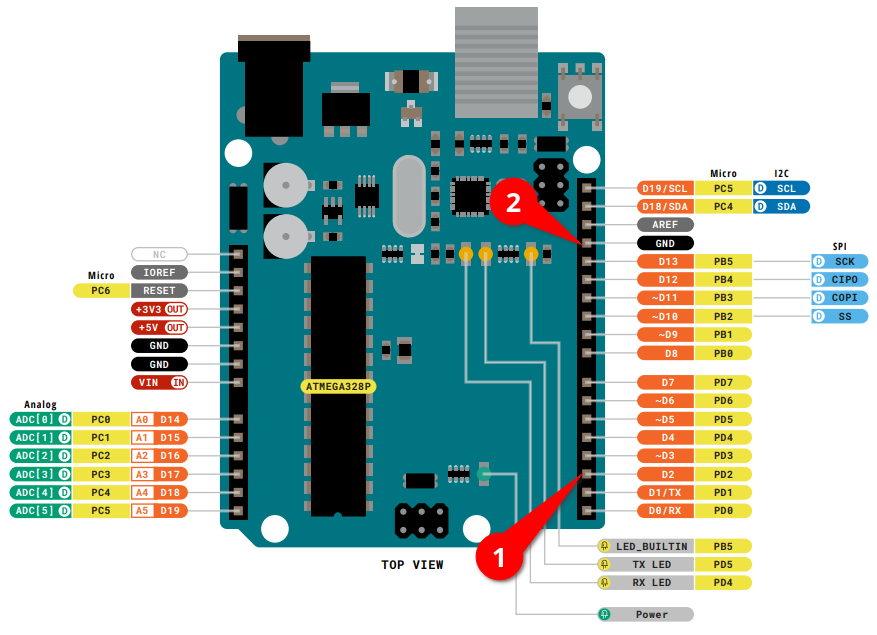
Connect a switch between the two red marks.





You must be logged in to post a comment.